
AnyRoR / E-Dhara and Gujarat Bhunaksha 2026: Check AnyRoR Land Map, Village Map Gujarat and 7/12 8A Utara
Check and download Gujarat VF-7/12 (Satbara) & VF-8A online. View interactive Village Tippan / Resurvey Map plot maps using your Survey Number / Block Number. Track VF-6 (Hak Patrak / Mutation Entry) status and obtain digitally signed revenue records in ગુજરાતી (Gujarati) and English.
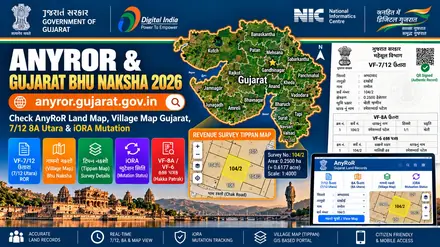
anyror.gujarat.gov.in) portal overview for VF-7/12, Village Tippan / Resurvey Map, and VF-6.
AnyROR ગુજરાત 7/12 (સાતબાર), 8-અ, હક પત્રક (VF-6) અને જમીન નકશો ઓનલાઈન જુઓ
ગુજરાતમાં જમીનનો 7/12 ઉતારો (ગામ નમૂના નં. 7 અને 12), 8-અ ખાતાવહી, હક પત્રક (VF-6 ફેરફાર નોંધ) અને પ્રોપર્ટી કાર્ડ ઓનલાઈન જોવા માટે મહેસૂલ વિભાગની અધિકૃત વેબસાઈટ anyror.gujarat.gov.in અને iora.gujarat.gov.in પર જાઓ. તમારો જિલ્લો, તાલુકો અને ગામ પસંદ કરી સર્વે નંબર દ્વારા જમીન રેકોર્ડ અને નકશો મેળવો.
ગુજરાત: મહેસૂલ પોર્ટલ અને જમીન રેકોર્ડ સંક્ષિપ્ત માહિતી
| વિગત | અધિકૃત માહિતી |
|---|---|
| રાજ્ય / કેન્દ્રશાસિત પ્રદેશ | ગુજરાત (Gujarat) |
| અધિકૃત પોર્ટલનું નામ | એનીઆરઓઆર ગુજરાત (AnyROR Gujarat & iORA) |
| મહેસૂલ વિભાગ | Revenue Department, Government of Gujarat |
| હક્ક પત્રક / ROR દસ્તાવેજ | VF-7/12 (Satbara) & VF-8A |
| જમીન નકશો (Plot Map) | Village Tippan / Resurvey Map |
| સર્વે નંબર / બ્લોક નંબર | Survey Number / Block Number |
| ખાતા નંબર (8-અ) | Khata Number (Form 8A) |
| ફેરફાર નોંધ (VF-6 Mutation) | VF-6 (Hak Patrak / Mutation Entry) |
| વહીવટી ક્રમ | District (Jilla) → Taluka → Village (Gam) |
ગુજરાત: અધિકૃત સરકારી વેબસાઈટ લિંક્સ
| પોર્ટલનું નામ | મુખ્ય સેવા | વેબસાઈટ લિંક |
|---|---|---|
| AnyROR Gujarat Portal | VF-6, VF-7, VF-8A & Property Card | પોર્ટલ ખોલો ↗ |
| iORA Gujarat Portal | Online Mutation, NA & Signed Copies | પોર્ટલ ખોલો ↗ |
AnyROR ગુજરાત પરથી જમીન રેકોર્ડ અને નકશો જોવાની રીત
- અધિકૃત પોર્ટલ anyror.gujarat.gov.in ખોલો અને 'View Land Record - Rural / Urban' પસંદ કરો.
- તમારો જિલ્લો (District), તાલુકો (Taluka) અને ગામ (Village) પસંદ કરો.
- જમીનનો સર્વે નંબર (Survey No.) અથવા ખાતેદારનું નામ દાખલ કરી રેકોર્ડ અને ક્ષેત્રફળ (હેક્ટર-આર-ચો.મી.) જુઓ.
- ડિજિટલ સહીવાળી (QR Code સાથે) અધિકૃત નકલ અને નકશા માટે iora.gujarat.gov.in નો ઉપયોગ કરો.
ગુજરાત ગામ નમૂના નં. 7/12, 8-અ અને હક પત્રક (VF-6) ઓનલાઈન તપાસવા
- anyror.gujarat.gov.in પર Rural Land Record માંથી VF-7/12, VF-8A અથવા VF-6 વિકલ્પ પસંદ કરો.
- સર્વે નંબર અને કેપ્ચા કોડ નાખી 'Get Record Detail' પર ક્લિક કરો અને પ્રિન્ટ કાઢો.
ગુજરાત: વારંવાર પૂછાતા પ્રશ્નો (FAQ)
1. ગુજરાતમાં ઓનલાઈન 7/12 અને 8-અ ઉતારો કઈ વેબસાઈટ પરથી મળે છે?
ગુજરાત સરકારના મહેસૂલ વિભાગના પોર્ટલ anyror.gujarat.gov.in પર માહિતી માટે અને iora.gujarat.gov.in પર ડિજિટલ સહીવાળી 7/12, 8-અ નકલ ઉપલબ્ધ છે.
2. જમીનનો નકશો અને ઉતારો જોવા માટે કઈ વિગતો જોઈએ?
તમારો જિલ્લો, તાલુકો અને ગામ પસંદ કર્યા પછી જમીનનો Survey Number / Block Number / Khata Number (Form 8A) જરૂરી છે.
3. શું ઓનલાઈન પ્રિન્ટ બેંક લોન કે કાયદાકીય કામ માટે માન્ય છે?
સાદી પ્રિન્ટ માત્ર માહિતી માટે છે. બેંક લોન કે દસ્તાવેજ માટે QR કોડ સાથેની ડિજિટલ સહીવાળી (Digitally Signed) નકલ ડાઉનલોડ કરો. Digitally signed RoR copies with QR verification can be downloaded online through the iORA Gujarat portal.
Gujarat (GJ) official ROR, Bhu Naksha, citizen login and IGRS EC portal linkup
Each government task in Gujarat uses a specific portal module. Follow the exact menu path listed on each card below so you go straight to the right screen:
AnyROR Gujarat (VF-7/12, VF-8A & VF-6 Hakka Patrak Free View)
Exact Menu Path: View Land Record (Rural/Urban) > Select VF-7, VF-8A or VF-6 > Select District, Taluka & Village
Check live landowner names, co-sharer shares, land class, and bank loan remarks by Survey Number / Block Number or Khata Number.
AnyROR / Revenue Survey Cadastral Tippan & Village Map
Exact Menu Path: iORA Online Services > Digital Village Map / Tippan & Measurement Sheet Lookup
View the scaled village plot map (Village Tippan / Resurvey Map), check 4-side boundary dimensions, road access, and neighboring plot numbers.
iORA Gujarat Citizen Login (Signed RoR, Online VF-6 Mutation & NA Permission)
Login & Path: Citizen Mobile Number + OTP Login > Apply for Online Mutation, NA Conversion or Signed RoR
Download legally valid Digitally Signed QR copies, pay annual land tax online, and file or track VF-6 cases.
GARVI Gujarat (IGR Index-II Search, Jantri Rate & EC)
Exact Menu Path: Citizen Search > Property Search (Index-II) & Jantri Valuation Calculator
Verify registered Sale Deeds (Index-II), 12 to 30 year Encumbrance Certificates (EC), government circle rates, and prohibited land lists.
Gujarat (ગુજરાત) direct service launcher
Select your land record service below to open the official AnyROR Gujarat & iORA portal:
1. View plot map (Village Tippan / Resurvey Map)
Check plot shape, boundary lengths, and neighboring parcels with your Survey Number / Block Number.
2. Check ownership (VF-7/12)
Check recorded owner names, share extent, and crop details with your Khata Number (Form 8A).
3. Track VF-6 (Hak Patrak / Mutation Entry)
Check mutation status after deed registration or family inheritance.
4. Certified QR copy
Download a digitally signed ROR or map PDF for bank loans and court use.
Gujarat (ગુજરાત) citizen land utility suite (7 interactive calculators and verification tools)
Select any tool below to convert land units, measure 4-sided irregular plots, split joint family shares, calculate stamp duty, convert map scales, check required documents, or verify property records for AnyROR Gujarat & iORA:
Enter your plot area from AnyROR Gujarat & iORA to convert it across standard and regional measurement units. Click any result to copy.
Enter the North, South, East, and West boundary lengths of your plot from the Village Tippan / Resurvey Map to calculate exact area.
Enter the property market or circle rate value to estimate stamp duty, female buyer concession savings, and registration fees.
Measure any plot side on your printed Village Tippan / Resurvey Map with a ruler and convert that paper length into actual ground distance in Feet, Meters, and Kadi.
Choose the land revenue service you want to apply for to view the required documents, fee, and approval timeline.
Check off each verified item below while reviewing the seller's VF-7/12 and Village Tippan / Resurvey Map before property registration.
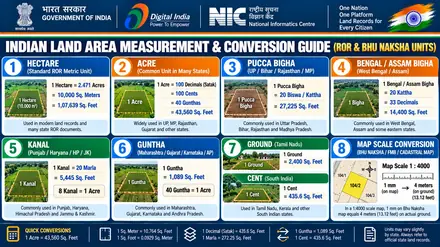
How to check Gujarat (ગુજરાત) land records and plot map online
Open the official AnyROR Gujarat & iORA portal (official AnyROR Gujarat & iORA (anyror.gujarat.gov.in)) managed by the Revenue Department, Government of Gujarat. Select your District (Jilla), Taluka, Village (Gam) from the menu. Enter your Survey Number / Block Number or Khata Number (Form 8A) to view the VF-7/12 (Satbara) & VF-8A and download the Village Tippan / Resurvey Map PDF report.
Gujarat (ગુજરાત) revenue portal fact sheet
| Attribute | Official Gujarat Details |
|---|---|
| State or Union Territory | Gujarat • ગુજરાત (West India) |
| Official Languages | ગુજરાતી (Gujarati) and English |
| Official Portal Name | AnyROR Gujarat & iORA (એનીઆરઓઆર ગુજરાત (AnyROR Gujarat & iORA)) |
| Managing Authority | Revenue Department, Government of Gujarat |
| Ownership Document (ROR) | VF-7/12 (Satbara) & VF-8A |
| Cadastral Plot Map | Village Tippan / Resurvey Map |
| Plot or Survey Identifier | Survey Number / Block Number |
| Account or Ledger Identifier | Khata Number (Form 8A) |
| Mutation Process | VF-6 (Hak Patrak / Mutation Entry) |
| Administrative Hierarchy | District (Jilla) → Taluka → Village (Gam) |
Official Gujarat government portals
The Revenue Department, Government of Gujarat runs online portals for land ownership registers, plot boundaries, and revenue case updates. Gujarat organizes its digital records under VF-7/12 (Satbara) & VF-8A and Village Tippan / Resurvey Map. You can also check nearby regional portals for Maharashtra (Mahabhulekh (Bhulekh Mahabhumi) & MahaBhunaksha) and Goa (DSLRS Goa & Goa Online).
| Portal Name | Primary Service | Official Website Link |
|---|---|---|
| AnyROR Gujarat Portal | VF-6, VF-7, VF-8A & Property Card | AnyROR Gujarat Portal (anyror.gujarat.gov.in) ↗ |
| iORA Gujarat Portal | Online Mutation, NA & Signed Copies | iORA Gujarat Portal (iora.gujarat.gov.in) ↗ |
Details needed to check Gujarat land records
Keep these four details ready to check property records or plot maps on AnyROR Gujarat & iORA:
- Select your exact location sequence (District (Jilla) → Taluka → Village (Gam)) from the drop-down menus.
- Enter your Survey Number / Block Number to locate the land parcel on the village map and check its dimensions.
- Enter your Khata Number (Form 8A) to view all plots held by one landowner or family in the village.
- Search by the recorded landowner name whenever you want to look up the Survey Number / Block Number or Khata Number (Form 8A).
How to view and download Gujarat Village Tippan / Resurvey Map online
The cadastral map shows the physical shape, boundary lengths, and neighboring plots of a land parcel. Follow these five steps in Gujarat:
- Open the official Gujarat mapping portal (iORA Gujarat Portal).
- Select your District (Jilla) → Taluka → Village (Gam) in the location menu to load the village map sheet.
- Enter your Survey Number / Block Number in the search box, or click directly on the land parcel inside the village map.
- Review the owner names, plot area, and land classification displayed in the verification panel.
- Click Map Report or Sketch PDF to save the plot map with its scale and north arrow.
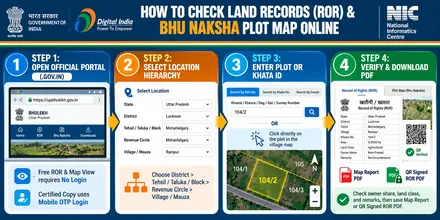
anyror.gujarat.gov.in.
How to check Gujarat VF-7/12 (Satbara) & VF-8A online
The VF-7/12 (Satbara) & VF-8A is the main text register of ownership, share extent, crop details, and bank loans. Follow these steps to view it online:
- Open AnyROR Gujarat Portal (https://anyror.gujarat.gov.in) in your web browser.
- Select the option to view VF-7/12 (Satbara) & VF-8A on the home screen.
- Choose your District (Jilla) → Taluka → Village (Gam) and the current revenue year.
- Select your search method (Survey Number / Block Number, Khata Number (Form 8A), or Owner Name), enter the value, and submit the captcha code.
- Check each co-owner's share, total land area, and the remarks column, then print or save the PDF copy.
How to read your Gujarat VF-7/12 and Village Tippan / Resurvey Map
Official revenue extracts on AnyROR Gujarat & iORA use five standard columns. Use this table to verify each section before buying land or applying for a loan:
| Document Column | Meaning in Gujarat | Buyer Verification Action |
|---|---|---|
| 1. Khata Number (Form 8A) | Unique ledger number assigned to a landowner or joint family holding in the village. | Match the seller's name and parent or spouse name with their Aadhaar card and sale deed. |
| 2. Survey Number / Block Number | Unique parcel number on the village cadastral map (Village Tippan / Resurvey Map). | Confirm that the plot number on the VF-7/12 (Satbara) & VF-8A matches the parcel on the Village Tippan / Resurvey Map. |
| 3. Land Area and Share | Total parcel area and each co-owner's fractional share. | Verify that the sale area stays within the seller's recorded share using the Area Unit Calculator. |
| 4. Land Classification | Category of land: Old Tenure (Juni Sharat - Freely Transferable), New Tenure (Navi Sharat - Restricted/Premium Applicable), and Non-Agricultural (NA) Land.. | Confirm that the parcel belongs to a private transferable land category. |
| 5. Remarks and Mutation | Lists VF-6 (Hak Patrak / Mutation Entry) orders, crop loans (KCC), bank mortgages, and court orders. | Confirm that the remarks column shows a clear title for the parcel. |
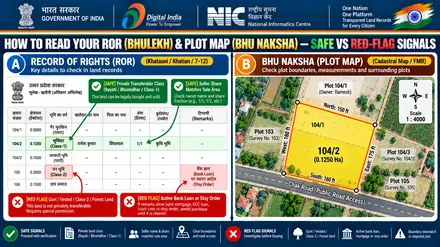
Gujarat land record services: fees, time and legal validity
Review the fee structure, processing time, and legal use case for each Gujarat revenue document:
| Service Type | Official Fee | Processing Time | Legal Validity and Use Case |
|---|---|---|---|
| Informational VF-7/12 (Satbara) & VF-8A View | Free (₹0) | Instant Online | Personal verification of owner name, share, and plot status. |
| Informational Village Tippan / Resurvey Map PDF | Free (₹0) | Instant Online | Checking plot boundaries, road access, and neighboring survey numbers. |
| Digitally Signed QR VF-7/12 (Satbara) & VF-8A or Map | ₹15 to ₹50 per copy | Instant to 24 Hours | Legally valid for bank loans, KCC, property registration, and courts. Digitally signed RoR copies with QR verification can be downloaded online through the iORA Gujarat portal. |
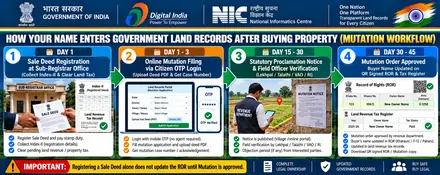
| VF-6 (Hak Patrak / Mutation Entry) Application | Standard State Tariff | 15 to 45 Working Days | Updates the buyer or legal heir name in the VF-7/12 (Satbara) & VF-8A after deed registration or succession. |
AnyROR Gujarat & iORA portal help and quick solutions
Follow these steps to resolve common display or search issues on the official Gujarat portal:
1. How to open the plot map report PDF
The Village Tippan / Resurvey Map portal opens PDF map reports in a new browser tab. Enable pop-ups in your Chrome settings for https://iora.gujarat.gov.in and click Show Report.
2. How to locate subdivided plot numbers
Plot subdivisions add suffix numbers or letters such as /1, /2, or Min. Search by the Landowner Name or Khata Number (Form 8A) first to view the updated plot number.
3. How to correct a name or area entry
Submit an online record correction request on AnyROR Gujarat & iORA with your registered deed copy, or visit your local e-Dhara Kendra (Mamlatdar Office).
Land classifications and official helpdesk in Gujarat
Land classifications in Gujarat: Old Tenure (Juni Sharat - Freely Transferable), New Tenure (Navi Sharat - Restricted/Premium Applicable), and Non-Agricultural (NA) Land..
Certified copy procedure: Digitally signed RoR copies with QR verification can be downloaded online through the iORA Gujarat portal.
Helpdesk and office support: e-Dhara Kendra (Mamlatdar Office) / Jan Seva Kendra.
Gujarat (GJ) AnyROR Gujarat & iORA: citizen login, plot information, online tax (Khajna/Lagan) and e-KYC
Use these five official citizen service modules on AnyROR Gujarat & iORA (anyror.gujarat.gov.in) to log in, check plot and VF-7/12 details by owner name, pay land revenue tax online, and link Aadhaar:
| Portal Module / Service | How It Works on AnyROR Gujarat & iORA (GJ) | Exact Menu Path & Citizen Action |
|---|---|---|
| 1. Free VF-7/12 & Plot Info No Login Needed |
Displays live plot area, land classification, co-sharer fractions, and VF-6 (Hak Patrak / Mutation Entry) history by Survey Number / Block Number, Khata Number (Form 8A), or Owner Name. | View Land Record (Rural/Urban) > Select VF-7, VF-8A or VF-6 > Select District, Taluka & Village on official Gujarat VF-7/12 portal (anyror.gujarat.gov.in) ↗. |
| 2. Cadastral Plot Map (Village Tippan / Resurvey Map) Direct Map Sheet |
Shows the scaled village map (`1:4000`), 4-side boundary lengths, road access, and neighboring plot numbers (Chauhaddi). | iORA Online Services > Digital Village Map / Tippan & Measurement Sheet Lookup on official Gujarat Village Tippan / Resurvey Map portal (iora.gujarat.gov.in) ↗. |
| 3. Citizen Login, Tax & VF-6 Mobile OTP Login |
Pays annual land revenue tax (Khajna / Lagan / Pauti), downloads digitally signed QR copies (₹15 to ₹50), and tracks VF-6 (Hak Patrak / Mutation Entry). | Citizen Mobile Number + OTP Login > Apply for Online Mutation, NA Conversion or Signed RoR on official Gujarat Citizen Login (iora.gujarat.gov.in) ↗. |
| 4. Sub-Registrar Deed & EC Check IGRS / Stamp Portal |
Verifies registered Sale Deeds (Index-II), 12 to 30 year Encumbrance Certificates (EC), government circle rates, and prohibited land lists. | Citizen Search > Property Search (Index-II) & Jantri Valuation Calculator on official Gujarat IGRS portal (garvi.gujarat.gov.in) ↗. |
5. Aadhaar e-KYC & Record CorrectionGrievance & Correction |
Links the landowner's Aadhaar and mobile number with their Khata Number (Form 8A) to prevent fraudulent transfers and correct clerical spelling or area errors. | Submit an online correction request with your registered deed PDF or apply to your local revenue officer (e-Dhara Kendra (Mamlatdar Office)). |
Gujarat (GJ) land classifications, transferability rules and buyer red-flag decoder
Before paying an advance or registering a Sale Deed in Gujarat (ગુજરાત), check the land classification code on the VF-7/12 against this legal verification table:
| Verification Check | Official Gujarat Revenue Code & Legal Meaning | What a Buyer or Owner Must Do |
|---|---|---|
| 1. Safe Transferable Land Class | Old Tenure / Juni Sharat (જૂની શરત: Freely Transferable; Verify NA Order for Non-Agricultural Buyer) | Confirm that the seller's name, parent/spouse name, and fractional share match both the VF-7/12 and the Sub-Registrar EC. |
| 2. Restricted / Prohibited Land Class (Red Flag) | New Tenure / Navi Sharat (નવી શરત: Requires Collector Premium Payment), Section 73AA Tribal Land, Gauchar | Do not pay an advance. Government, Vested, Forest, or Class-2/Assigned land cannot be sold without prior statutory Collector permission. |
| 3. Non-Agricultural (NA / Conversion) Check | Agricultural plots require formal land-use conversion (NA / Bastu / CLU / Diversion) before residential or commercial construction. | Verify the official Conversion Order number on the VF-7/12 before buying a plotted layout or house site. |
| 4. Un-Subdivided Joint Plot (Min / Bataank / Phodi) | When a plot is sold from a larger joint parcel, the new sub-division (`/1`, `/2`, `Min`) must be drawn on the Village Tippan / Resurvey Map. | Insist on an official pre-mutation sketch or boundary demarcation so your exact ground parcel is separated on the village map. |
| 5. Revenue Officer Escalation & Helpdesk | Official Authority: Revenue Department, Government of Gujarat Support & Escalation: e-Dhara Kendra (Mamlatdar Office) / Jan Seva Kendra |
File clerical corrections or delayed VF-6 appeals online with your Case Number and registered deed copy. |
Gujarat (GJ) district-wise AnyROR Gujarat & iORA and Bhu Naksha coverage
Official AnyROR Gujarat & iORA land records, VF-7/12 registers, and cadastral village maps cover all revenue districts and local revenue offices across Gujarat:
Land record terms used in Gujarat
Use these regional definitions to read Gujarat revenue documents accurately (see also the All-India Land Terminology Glossary):
VF-7 (Village Form 7)
Ownership, survey number, total area (Hectare-Are-Sq.Mt.), assessment, and Boja (bank loan/encumbrance) record.
VF-8A (Khatawani)
Account summary of all survey numbers held by an individual Khatedar in the village.
VF-6 (Hak Patrak)
Mutation register containing chronological entries of title changes and certifications.
Property Card
City Survey record for urban properties showing City Survey Number, Ward, and plot area.
Frequently asked questions (Gujarat (ગુજરાત))
1. [ગુજરાતી (Gujarati)] ગુજરાતમાં ઓનલાઈન 7/12 અને 8-અ ઉતારો કઈ વેબસાઈટ પરથી મળે છે?
ગુજરાત સરકારના મહેસૂલ વિભાગના પોર્ટલ anyror.gujarat.gov.in પર માહિતી માટે અને iora.gujarat.gov.in પર ડિજિટલ સહીવાળી 7/12, 8-અ નકલ ઉપલબ્ધ છે.
2. Which is the official website to check Gujarat land records and plot maps?
The Revenue Department, Government of Gujarat manages the official AnyROR Gujarat & iORA portal at official AnyROR Gujarat & iORA website (anyror.gujarat.gov.in).
3. What details are needed to view a plot map (Village Tippan / Resurvey Map) in Gujarat?
Select your location path (District (Jilla), Taluka, Village (Gam)) and enter your Survey Number / Block Number. You can also find the plot number by searching with the owner name in the VF-7/12 (Satbara) & VF-8A register or clicking the parcel on the village map.
4. How do I get a legally valid copy from AnyROR Gujarat & iORA for bank loans or court use?
Standard online printouts work for personal record verification. Download a digitally signed copy with a QR verification code or obtain a certified extract from your local revenue office or CSC for bank loans, registration, and court filings. Digitally signed RoR copies with QR verification can be downloaded online through the iORA Gujarat portal.
5. How do I update my name in Gujarat land records after buying land or inheritance?
Submit a VF-6 (Hak Patrak / Mutation Entry) application with your registered sale deed or succession certificate and identity proof on the state revenue portal or local Tehsil office. The revenue office updates the VF-7/12 (Satbara) & VF-8A after approving the mutation order.